Loading and Defining Custom Spectral File Formats
Loading From a File
Specutils leverages the astropy io registry to provide an interface for conveniently
loading data from files. To create a custom loader, the user must define it in
a separate python file and place the file in their ~/.specutils directory.
Loading from a FITS File
A spectra with a Linear Wavelength Solution can be read using the read
method of the Spectrum1D class to parse the file name and
format
import os
from specutils import Spectrum1D

file_path = os.path.join('path/to/folder', 'file_with_1d_wcs.fits')

spec = Spectrum1D.read(file_path, format='wcs1d-fits')
This will create a Spectrum1D object that you can manipulate later.
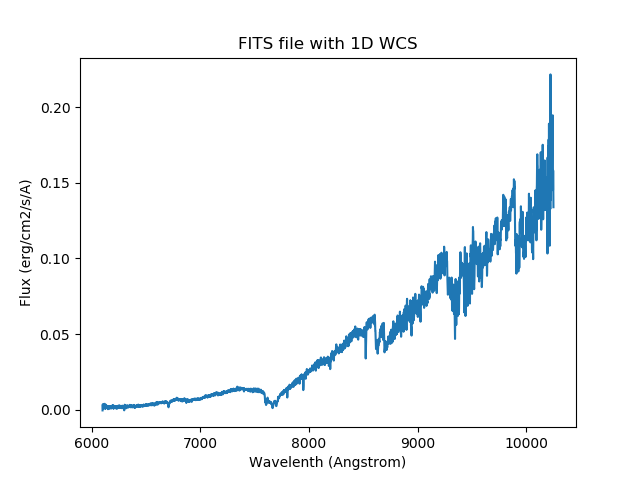
For instance, you could plot the spectrum.
import matplotlib.pyplot as plt

plt.title('FITS file with 1D WCS')
plt.xlabel('Wavelength (Angstrom)')
plt.ylabel('Flux (erg/cm2/s/A)')
plt.plot(spec.wavelength, spec.flux)
plt.show()
Creating a Custom Loader
Defining a custom loader consists of importing the
data_loader decorator from specutils and attaching
it to a function that knows how to parse the user’s data. The return object
of this function must be a Spectrum1D object.
Optionally, the user may define an identifier function. This function acts to ensure that the data file being loaded is compatible with the loader function.
# ~/.specutils/my_custom_loader.py
import os

from astropy.io import fits
from astropy.nddata import StdDevUncertainty
from astropy.table import Table
from astropy.units import Unit
from astropy.wcs import WCS

from specutils.io.registers import data_loader
from specutils import Spectrum1D

# Define an optional identifier. If made specific enough, this circumvents the
# need to add ``format="my-format"`` in the ``Spectrum1D.read`` call.
def identify_generic_fits(origin, *args, **kwargs):
    return (isinstance(args[0], str) and
            os.path.splitext(args[0].lower())[1] == '.fits')


@data_loader("my-format", identifier=identify_generic_fits,
             extensions=['fits'])
def generic_fits(file_name, **kwargs):
    name = os.path.basename(file_name.rstrip(os.sep)).rsplit('.', 1)[0]

    with fits.open(file_name, **kwargs) as hdulist:
        header = hdulist[0].header

        tab = Table.read(file_name)

        meta = {'header': header}
        wcs = WCS(hdulist[0].header)
        uncertainty = StdDevUncertainty(tab["err"])
        data = tab["flux"] * Unit("Jy")

    return Spectrum1D(flux=data, wcs=wcs, uncertainty=uncertainty, meta=meta)
An extensions keyword can be provided. This allows for basic filename
extension matching in the case that the identifier function is not
provided.
It is possible to query the registry to return the list of loaders associated with a particular extension.
from specutils.io import get_loaders_by_extension

loaders = get_loaders_by_extension('fits')
The returned list contains the format labels that can be fed into the format
keyword argument of the Spectrum1D.read method.
After placing this python file in the user’s ~/.specutils directory, it
can be utilized by referencing its name in the read method of the
Spectrum1D class
from specutils import Spectrum1D

spec = Spectrum1D.read("path/to/data", format="my-format")
Loading Multiple Spectra
It is possible to create a loader that reads multiple spectra from the same
file. For the general case where none of the spectra are assumed to be the same
length, the loader should return a SpectrumList. Consider the
custom JWST data loader as an example:
import astropy.units as u
from astropy.io import fits

from ...spectra import Spectrum1D, SpectrumList
from ..registers import data_loader


def identify_jwst_fits(origin, *args, **kwargs):
    """
    Check whether the given file is a JWST spectral data product.

    This check is fairly simple. It expects FITS files that contain an ASDF
    header (which is not used here, but indicates a JWST data product). It then
    looks for at least one EXTRACT1D header, which contains spectral data.
    """

    try:
        with fits.open(args[0]) as hdulist:
            # This is a near-guarantee that we have a JWST data product
            if not 'ASDF' in hdulist:
                return False
            # This indicates the data product contains  spectral data
            if not 'EXTRACT1D' in hdulist:
                return False
        return True
    # This probably means we didn't have a FITS file
    except Exception:
        return False


@data_loader("JWST", identifier=identify_jwst_fits, dtype=SpectrumList,
             extensions=['fits'])
def jwst_loader(filename, spectral_axis_unit=None, **kwargs):
    """
    Loader for JWST data files.

    Parameters
    ----------
    file_name: str
        The path to the FITS file

    Returns
    -------
    data: SpectrumList
        A list of the spectra that are contained in this file.
    """

    spectra = []

    with fits.open(filename) as hdulist:
        for hdu in hdulist:
            if hdu.name != 'EXTRACT1D':
                continue

            wavelength = hdu.data['WAVELENGTH'] * u.Unit(hdu.header['TUNIT1'])
            flux = hdu.data['FLUX'] * u.Unit(hdu.header['TUNIT2'])
            error = hdu.data['ERROR'] * u.Unit(hdu.header['TUNIT3'])

            meta = dict(slitname=hdu.header.get('SLTNAME', ''))

            # TODO: pass uncertainty using the error from the HDU
            spec = Spectrum1D(flux=flux, spectral_axis=wavelength, meta=meta)
            spectra.append(spec)

    return SpectrumList(spectra)
Note that by default, any loader that uses dtype=Spectrum1D will also
automatically add a reader for SpectrumList. This enables user
code to call specutils.SpectrumList.read in
all cases if it can’t make assumptions about whether a loader returns one or
many Spectrum1D objects. This method is available since
SpectrumList makes use of the Astropy IO registry (see
astropy.io.registry.read).
Creating a Custom Writer
Similar to creating a custom loader, a custom data writer may also be defined.
This again will be done in a separate python file and placed in the user’s
~/.specutils directory to be loaded into the astropy io registry.
# ~/.spectacle/my_writer.py
from astropy.table import Table
from specutils.io.registers import custom_writer


@custom_writer("fits-writer")
def generic_fits(spectrum, file_name, **kwargs):
    flux = spectrum.flux.value
    disp = spectrum.dispersion.value
    meta = spectrum.meta

    tab = Table([disp, flux], names=("dispersion", "flux"), meta=meta)

    tab.write(file_name, format="fits")
The custom writer can be used by passing the name of the custom writer to the
format argument of the write method on the
Spectrum1D.
spec = Spectrum1D(flux=np.random.sample(100) * u.Jy,
                  spectral_axis=np.arange(100) * u.AA)

spec.write("my_output.fits", format="fits-writer")
Reference/API
A module containing the mechanics of the specutils io registry.
Functions
|
Wraps a function that can be added to an |
|
|
|
Retrieve a list of loader labels associated with a given extension. |